



How many people in your church own a business and have never been invited to give from it? Church giving conversations usually center on personal giving: the paycheck, the recurring gift, the Sunday moment. For a business owner, that can leave out the account where some of them have more room to give. If they've never given from the business, it may not be for lack of willingness. They may simply never have been offered a simple way to do it.
And when a business owner does want to give from the business, many giving platforms leave two options. They can create a second donor account under a different email, or they can write a paper check.
Both options cost something. A second account is one more login to remember, and it splits one person's giving across two records your team has to keep apart. A paper check sends the gift back to a manual process your team has to enter by hand.
Business Giving, part of the Overflow giving platform, gives them that simple way. A donor marks a card or bank gift as coming from their business at checkout, using the login they already have. The business name follows the gift onto the payment, the giving history, statements and receipts.
How it works
- A donor marks a card or bank gift as a business gift at checkout, using the same Overflow login they use for personal gifts.
- On bank gifts, the business name is the account holder on the payment, which prevents name-mismatch declines.
- The business name follows the gift onto the donor's giving history, statements and receipts.
- Statements filter by Personal or Business, and business statements show the business's EIN when one is on file.
- Your team can log business checks and phone gifts as business gifts in Gift Entry or the Virtual Terminal.
Why business giving gets messy
A business gift doesn't fit a giving flow built only for individuals, so donors and finance teams invent workarounds.
At least one widely used church management platform documents its fix for business donors as a second profile under the same name with a different email address. Its own guidance also warns admins to leave notes so the duplicate profile isn't merged by accident. Other donors type "LLC" into a last-name field, set up email aliases for each business, or give up on online giving for business gifts and mail a check.
Each workaround lands on your finance team:
- Bank name mismatches. When a gift comes from a business bank account but the payment carries the donor's personal name, the mismatch can lead to a declined gift.
- Mixed records. Personal and business gifts end up blended in one history, or split across duplicate profiles that someone has to reconcile.
- Custom statements. At year-end, someone builds business statements by hand when the system can't separate them.
Giving from a business with Overflow, step by step
A donor gives from their business inside the normal giving flow. Nothing changes for donors who only give personally.
- On the payment step, the donor marks the gift as a business payment. Card and bank account are the supported methods.
- They pick one of their saved businesses or add a new one. Only the business name is required. A billing address is optional and helps with receipts. Each business name must be unique on that donor's account.
- For a bank gift, the donor confirms an authorization checkbox before submitting.
- The donor finishes the gift as usual.
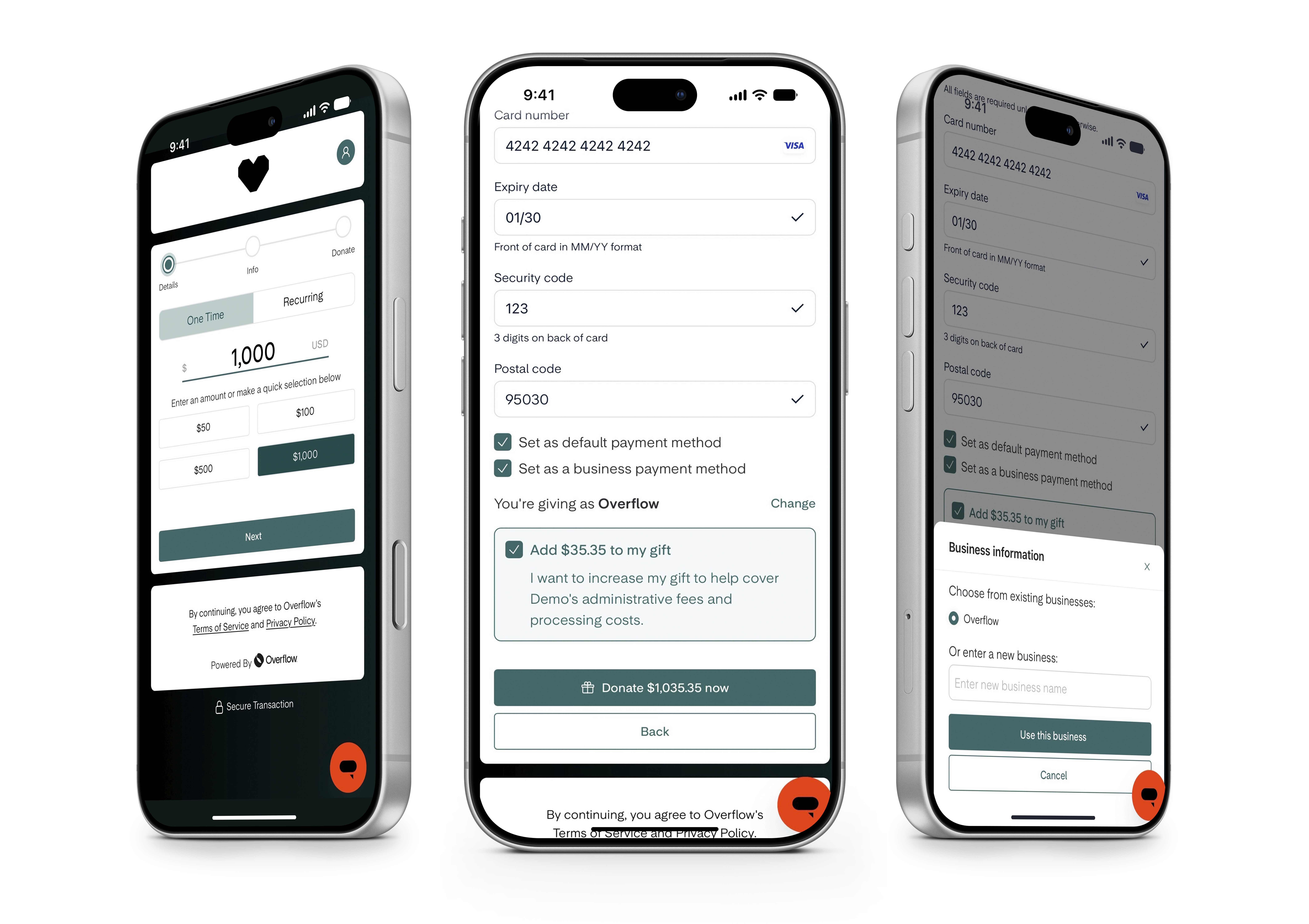
What happens to the payment depends on the method. For a card gift, the business is attached as the attribution and billing address on the charge, and the cardholder name stays the donor's. For a bank gift, the business name is used as the account holder. It seems like a small change, but it's what prevents name-mismatch declines when a gift comes from a business account.
Donors manage their businesses from account settings, and one donor can have more than one business. A business can be attached when a donor makes a new gift or restarts one, including a recurring gift.
See for yourself in this Business Giving demo
The donor keeps one login; marking a card or bank gift as business sends it down the business path. The EIN shows only when one is on file, and the receipt goes to the business email only when one is on file.
What your finance team sees
Business gifts stay on the donor's existing record, with the business attached to each gift. You don't manage a separate business donor.
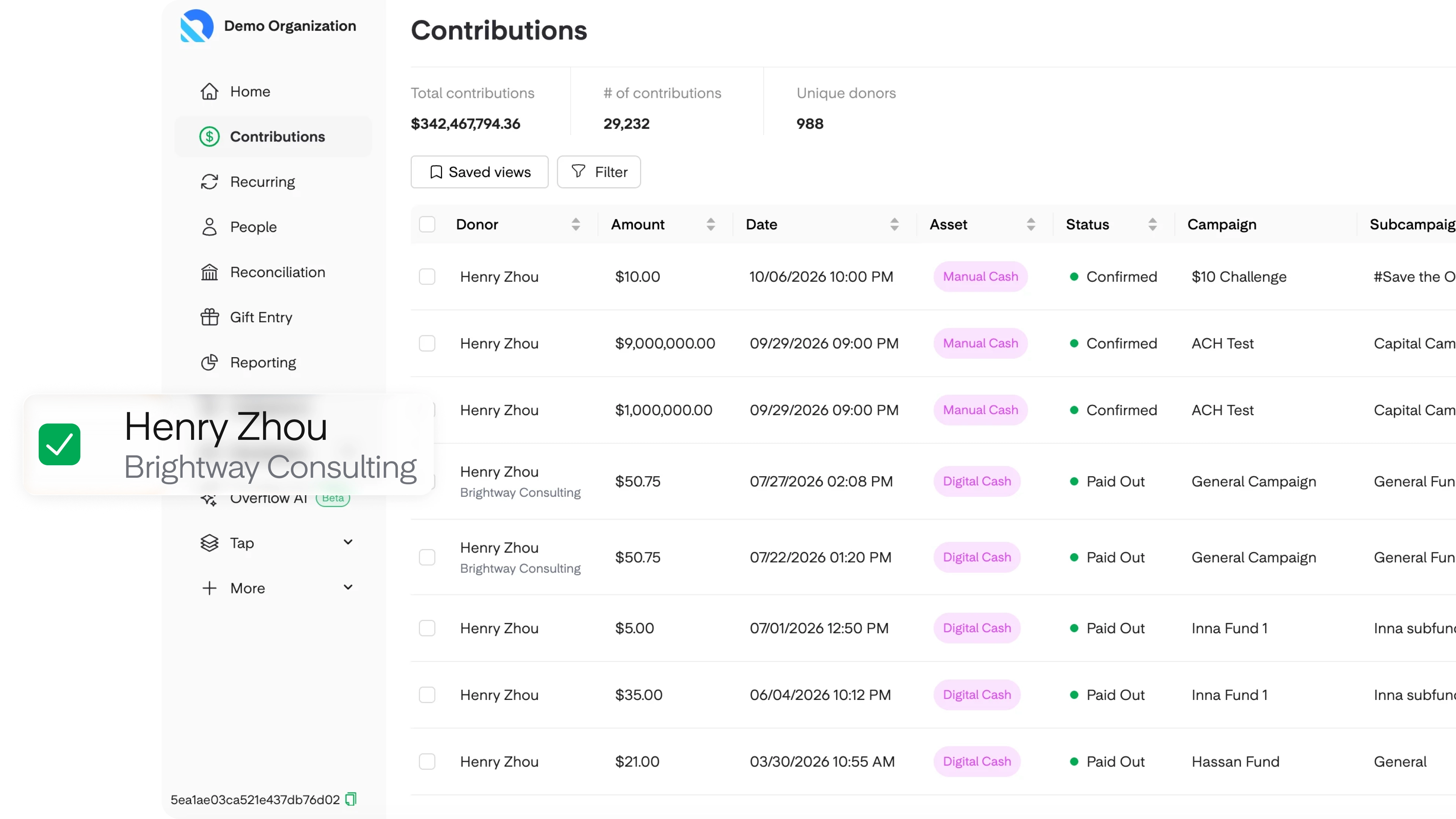
- Contributions and Recurring. The business name appears under the donor's name. The gift's side drawer shows the full business details.
- Donor detail page. A Business Profiles tab lists every business tied to that donor and the gifts each one has given.
- Statements. Filter statements by Personal or Business. A business statement shows the business name and its EIN when the business has one on file.
- Receipts. Receipts use the business's billing details. If the business has an email on file, the receipt goes there as well as to the donor.
- Checks and phone gifts. In Gift Entry or the Virtual Terminal, start a gift for the donor, mark it as from a business, and select or add the business inline.
Donors manage their own businesses. Admins can edit a business only on a donor record that isn't linked to a donor login, which keeps a donor's business details under their control. For the full steps on logging offline gifts, visit this link!
How to introduce business giving at your church
Business owners won't use an option they don't know exists. Here's a simple way to roll it out.
- Check your giving flow. Open your giving page and confirm the business option appears on the payment step. If it doesn't, contact your Overflow team.
- Tell your givers. Add a line to your giving page, mention it in your next giving announcement, and include it in year-end giving communication.
- Start a direct conversation. Ask your business owners whether they've ever wanted to give from the business itself, not only personally.
- Log business checks as business gifts. When a check arrives from a business, mark it as a business gift in Gift Entry so it lands on the right statement.
- Send business statements at year-end. Filter statements by Business so each business gets its own record.
For help building a culture of generosity alongside it, explore Generosity University.
Frequently asked questions
Does a business need its own login?
No. A donor uses their normal Overflow account and marks the gift as business at checkout. There's no separate business login.
Is an EIN required?
No. The business name is the only required field. If an EIN is on file, it appears on the business's statements.
Can a donor use Apple Pay or Google Pay for a business gift?
No. Business gifts must be paid with a card or a bank account.
Can our team record a check written from a business?
Yes. Log it in Gift Entry, mark it as from a business, and select or add the business. It's recorded as a business gift on the donor's record.
Does Overflow give tax advice on business gifts?
No. Business statements give the business its own record of giving. Encourage business owners to ask their tax advisor how a gift from their business should be handled.
Give business owners a simple way to give
The business owners in your church shouldn't have to choose between a second account and a paper check. Business Giving keeps one login, puts the business name on the payment, and gives your finance team clean business statements at year-end.
See it for yourself in the Business Giving walkthrough, or book a demo to talk through how it fits your church. Already using Overflow? Read the Business Giving help doc.
Overflow is a revolutionary generosity partner
We make giving donations easier than buying a cup of coffee.
Need help automating it all?
Let's unlock the full potential of your community's generosity together.
Need help automating it all?
Let's unlock the full potential of your community's generosity together.

Share this article
Related Content



Sign up for our updates
Stay up to date on the latest innovations happening at Overflow.