.jpg)

When Overflow first introduced Overflow Tap in 2023, it was built around a simple belief: giving and engagement should feel effortless in the moment, not forced or distracting.
Since then, other Tap-style devices have entered the market. But instead of copying what works, we focused on making Tap better.
Behind the scenes, our team has been building ways to make Tap smarter and better suited for real Sundays.
We build with the user in mind. And we know production teams already carry an enormous load, managing slides, lighting, audio, lyrics, and livestreams all at once.
That’s why, we’ve officially launched the general availability of the ProPresenter integration for Overflow Tap.
Instead of asking teams to change how they work, this integration allows Tap to work the way they already do, directly from ProPresenter. The slides drive the moment, and Tap stays perfectly in sync.
If your church already uses ProPresenter and church giving software, this integration keeps key moments in sync without changing how your team runs Sundays.
See it in Action
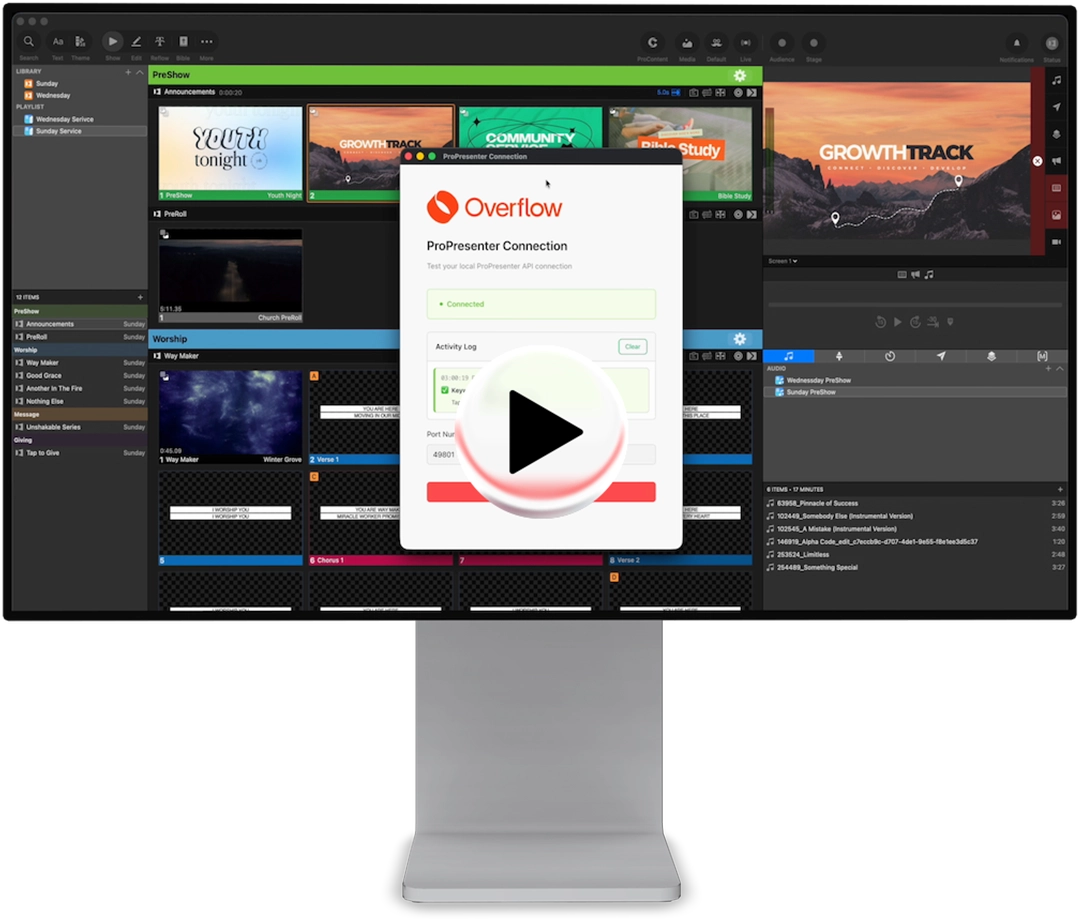
How ProPresenter works with church giving software
How does ProPresenter work with church giving software?
ProPresenter uses simple keywords in your slide notes.
You choose a keyword, like “giving,” and link it to a Tap destination in Overflow. When that slide shows during the service, Tap updates in real time.
What’s happening on stage matches what people see when they tap their phones.
What’s now possible with Overflow Tap
Overflow’s ProPresenter integration lets churches update Tap when slides change in real time.
Instead of scheduling or timing links to match each moment, Tap follows your ProPresenter slides, keeping everything aligned no matter how the Holy Spirit moves.
At a high level, this looks like:
- Create a keyword and choose a destination (URL)
- Assign that keyword to your Tap
- Set the rule active
Whether the moment is generosity or connection, the experience stays synced to what’s happening live.
For churches using church giving software, this makes a real difference. Giving works best when the call to action appears right away, not late or on the wrong page.
Friction is the enemy of engagement
Across hundreds of churches, we’ve seen one clear truth: the easier it is to respond, the more people do.
Overflow Tap was built first as an engagement device, designed to meet people in the natural flow of the service. Whether that response is giving, connection, prayer, or baptism, Tap removes extra steps in the moment someone is ready to respond.
Because of that focus, Tap has been shown to be 42x more effective than traditional engagement methods like QR codes and paper connection cards. Giving is part of that experience through built-in ExpressGive, but it’s not the only outcome.
Tap now stays in lockstep with what’s on screen. If a pastor skips a slide or moves faster than planned, Tap follows what’s on the screen, keeping everything aligned.
Why this matters for real Sunday teams
ProPresenter is already volunteer-friendly. Your team knows it, trusts it, and runs services on it every week.
Overflow Tap is built to reduce barriers for attendees, making it easy to respond in the moment. When you connect the two, you remove stress on both sides of the experience.
This integration helps teams by delivering:
- More consistent engagement: Tap always matches what’s being asked on stage.
- More focus in the room: People respond without distractions, like the wrong URL.
- Better volunteer experience: Fewer moving parts during the service.
With ProPresenter synced to Tap, your church giving software stays aligned at all times, so that next steps and giving moments are more seamless than ever.
A better way to run online giving for churches
Online giving for churches works best when the moment to give is clear and immediate.
When someone decides to give, hesitation usually comes from extra steps, not a lack of desire. This integration keeps your church giving software in sync with the service so giving feels natural and timely.
Instead of passing buckets or pointing people to a QR code, Tap shows the right next step at the right time.
Why your production team will love this
Sunday mornings can be busy and high pressure. This integration lowers stress instead of adding more.
- Volunteer peace of mind: If the slide is on screen, the link is live.
- Invisible precision: Keywords live in slide notes and never appear on stage displays.
- Multi-campus flexibility: Trigger specific destinations per group or across your entire organization.
Instead of watching dashboards, your team stays focused on the service and the ministry happening in the room.
Beyond Just Giving
While this is a game-changer for online giving, you can use keywords for any next step in your service:
- Keyword: CONNECT → Links to your digital connect card.
- Keyword: PRAY → Triggers a live prayer request form.
- Keyword: BAPTISM → Opens the signup page for your next baptism.
What you’ll need
- A computer running ProPresenter (GA supports Mac, Windows support is planned next)
- Access to your Overflow Dashboard
- Tap groups already configured (or ready to configure)
- Keywords you want to use (giving, connect, prayer, baptism, etc.)
Quick start checklist for users
- Install the ProPresenter integration app from the Overflow Dashboard.
- Enable ProPresenter network settings and copy the network port.
- Add keywords to your slide notes in ProPresenter.
- Map keywords to destinations within the Overflow Dashboard.
- Run a pre-service test to ensure the connection is active.
FAQ
What is the Overflow x ProPresenter integration?
It’s a connection between ProPresenter and Overflow Tap that automatically switches Tap destinations based on keywords in ProPresenter slide notes.
Does this change what’s on the screens in the room?
No. Keywords live in slide notes and remain invisible unless you choose to display them.
Is Overflow Tap only for giving?
No. Churches also use it for prayer, digital connection cards, baptisms, and next steps.
Can I apply one keyword to multiple groups or campuses?
Yes. The configuration supports selecting which group(s) a keyword affects, including multiple groups.
Technology as ministry
At the end of the day, this isn’t just a feature update. It’s about making sure that when someone is ready to take a next step, the path is clear and easy.
Let your slides handle the logistics so your team can stay focused on the ministry happening in the room.
Watch the Interactive Demo
Want to follow along step by step? This short walkthrough shows setup, keyword mapping, and how to test before service.
What’s Next
To get setup help and step-by-step instructions, visit the Integrations page in your Overflow Dashboard.
Let your slides do the switching so your team can stay present in the moment.
Not using Overflow Tap yet? Connect with our team to learn how Tap can help your church increase engagement and simplify next steps.
Need help automating it all?
Let's unlock the full potential of your community's generosity together.
Overflow is a revolutionary generosity partner
We make giving donations easier than buying a cup of coffee.
Need help automating it all?
Let's unlock the full potential of your community's generosity together.

Share this article
Related Content


Sign up for our updates
Stay up to date on the latest innovations happening at Overflow.